
First of all, locate the {Global Product ID} in the registry, the path is:
HKEY_LOCAL_MACHINE\SOFTWARE\Microsoft\Windows\CurrentVersion\Uninstall\*
The following command allows you to remove the software quietly and restart once its done.
MsiExec.exe /x {Global Product ID} /qn /forcerestart
Take Symantec Antivirus Clientas example,its {Global Product ID} is {33CFCF98-F8D6-4549-B469-6F4295676D83}。
Command example:
MsiExec.exe /x {33CFCF98-F8D6-4549-B469-6F4295676D83} /qn /forcerestart
ESET Enterprise user could excute the removal command thru the ESET Remote Administrtor:
a) Create their own script into a batch file.
b) In the ESET Remote Administrato, create the install package 。Press ”Remote Install”→”Packages”
c) Select ”Custom package” in ”Installation Packages Editor” →”Type”.
d) Press”Add”。
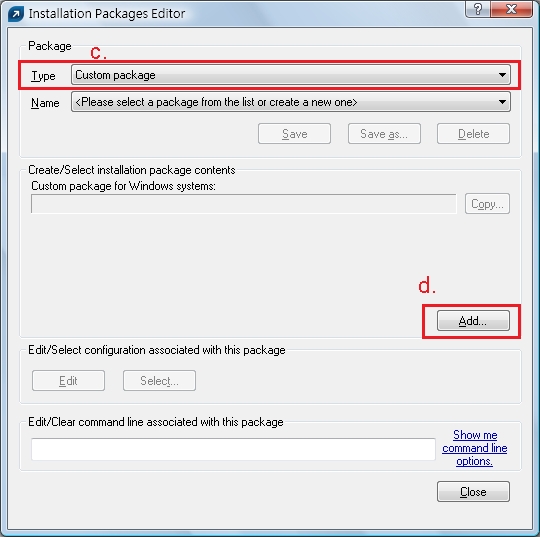
e) Press”Add File”and select the Batch file
f) Press”Create” &”Save as” to create package。
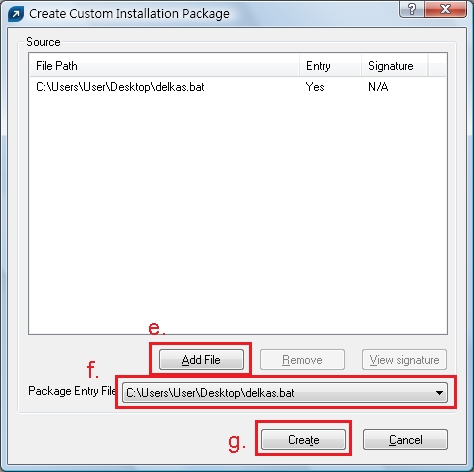
Administrator could remotely execute the package by “Push Install”.
| Manufacturer | Removing Tool | Contact Number |
| Kaspersky | Kaspersky 5.0 Kaspersky 6.0 | (852) 3529 1902 |
| Symantec/ Norton | Norton | (852) 2598 1234 |
| Trend Micro | Trend Micro | (852) 2612 0099 |
| McAfee | McAfee | 800-968-033 |
| F-Secure | F-Secure | |
| Avast | Avast | |
| AVG | AVG | |
| BitDefender | BitDefender | |
| Panda | Panda |